Frequently Asked Questions
!!! If something is wrong and you suspect corrupted data, reinstalling may not work as Android backs up and restores app states every time. Go to your phone settings, Apps, Folder Player, Storage, and tap "Clean Data" !!!
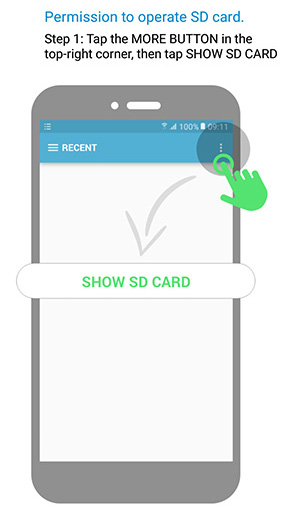
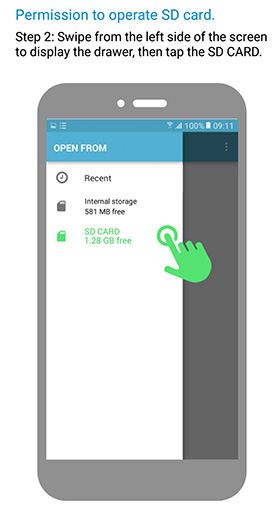
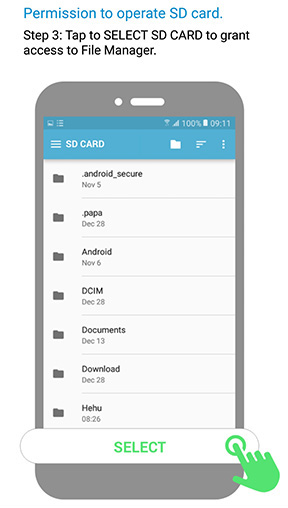
1. Folder Player does not see my files on my phone
Google Play Store declared war on apps with direct access to file systems.
Most users not affected by this, but some users are.
Please see a dedicated section covering this issue and potential fixes - Google's war on direct file access
2. Player shows FLAC/WAV/AAC files, but does not play them?
Playback for these is supported *ONLY IF* your device supports these formats (Folder Player is using your device built-in decoder and does not provide its own).
Here is the list of audio formats officially supported by Android OS.
3. I have music on my network drive. How can I play that from my phone?
Your phone is a Unix machine, and it is perfectly capable of mounting external network drives and see files as if the were stored locally. Unfortunately, most mobile operators block your ability to do that, however, if you happen to gain root access, you can search for "cifs" on Google Play and install application that allows this function. If you uncover a better solution please let me know, and I will post it here for others.
4. Why player stops playing by itself? Is it a bug?
Short answer - most likely Android killed the app due to agressive battery settings OR you have some outside interference
First, you need to check for these 3 things:
- In the app menu, check "Battery Use" and add Folder Player in the list of exceptions.
- In your phone settings (search or) go to
"(Battery and)Device Care" - > Battery - > "Background usage limits" - > "Never auto sleeping apps"
and make sure Folder Player (Pro) is listed
- if you have "Developer Options" active in your phone settings, check if "Don't keep activities" is On. Turn it off.
Other considerations:
If you notice that playback does not switch to the "next" song, this probably means that service was "killed" by the OS. Also, please
do NOT disable notifications.
If a media app is running without notifications, Android may kill its service at any time. Never use 3rd party "battery optimizer" apps and check battery settings of your device manufacturer were set into some agressive mode.
Also, some phone models have special "App Blocker" settings to advertise extreme battery saving capability, killing any service that is running for "too long". You need to whitelist Folder Player there.
One other thing: Folder Player can pause playback if it receives a request from your phone, such as bluetooth "stop" command, OR some other app (or device), issuing "stop" command to external players. If the app is still active in the notification area but stopped, Bluetooth activity might be the reason.
5. Why this app is running a background service?
Every music app needs to run a service, otherwise music will not be able to play in the background. If you want to shut down the service, use Menu > Exit in the app.
But if you want to save your battery, you don't need to do that as Folder Player does not use your battery if music is not playing.
Also, every service like that must be represented as an icon in the notification bar. If you want to hide the icon, go to your phone Settings->Application Manager->"Folder Player" and uncheck "Show Notifications" (BUT see #12 below for side effects)
6. Why application is asking for phone ID (and Nearby Devices) permission if this app is just playing audio?
Permission "read phone status" is (unfortunately) required to pause\restart playback after user picks up or hangs the phone.
"Nearby Devices" is needed to auto pause playback on Bluetooth headset (or car) (dis)connection.
Please remember that Folder Player does not have "internet" permission, so the app can't transfer anything online.
7. Does the app support playlists?
There is a support for similar functionality through the concept of "Tags". If you navigate to a track, in context menu you can associate song with a particular "tag". These tags are visible from the root, and can be played the same way as folders. Also, app supports m3u playlists which you create manually.
10. My playback is distorted. Can you fix this?
FolderPlayer does not process the sound. It is just an interface to find a track to play, waiting for next track to be played by you built-in system player.
During playback itself, FolderPlayer does virtually nothing, waiting for internal system Android media player to finish playback. If you hear any anomalies this should be a problem with the file itself, hardware/firmware of your phone, OR third party tools which may interfere with audio stream, such as equalizers.
11. When I click back from the settings the app disappears
Uncheck option "Don't keep activities" in the developer options in the phone settings.
12. No controls on my lock screen
If you disabled notification from the app you may not see controls on the lock screen.
13. I connect external USB drive, but the app can't see it
Make sure USB stick (or adapter) supports USB OTG specification.
14. Buttons in the notification area do not respond as expected
Go to "Menu" > "Battery Use" and add Folder Player in the list of exceptions.
15. Is there a way to stop Folder Player from automatically playing when a Bluetooth audio source is connected?
Folder Player does not have functionality to start playback on Bluetooth connect. However some external devices (typically, cars), upon connection send a subsequent "Media Play" command which Folder Player executes. Unfortunately, there is no way to distinguish whether this is automated request by a car, or a manual request by a user.
16. Playback does not stop when I disconnect from Bluetooth
You probably did not setup "Nearby Devices" permissions when you installed the app. Go to your phone settings -> Apps -> Folder Player -> App Permissions and check if nearby devices are allowed.
17. Android Auto: missing app icon
This is reported quite frequently and the reason is unknown. Users report that the problem fixes itself after phone reboot.
18. When I hit "Next" button, I see music progress but no sound
Check if you have "Gapless" enabled. Support for this feature is unstable and varies from device to device.
19. Android Auto: playback stops after few seconds when connected to the car
Some vehicles disconnect Bluetooth from the phone when Android Auto connection is established, which triggers pause in the player. The workaround is - ask player not to stop audio unpon Bluetooth disconnection in the app settings.
20. Android Auto: sideloaded version of the app does not show up on the car screen
In Android Auto app : 3-dot menu : Developer Settings : Enable "Unknown sources" or "Allow non-media apps" (exact wording is different for different brands)
How can you help?
If you'd like to share something important or you have an idea or comment, drop me a line at
.
Also, if you feel this application made your life brighter, please use this donate button :-)
Thanks!
|
|
 Get PRO version